“Cut 100 words” is simple math. “Stay within 10% of the limit” is not. That’s because 10% can mean two different things.
Does it mean 10% of the published limit? Or 10% of whatever you’ve already written? Those are two different targets. Mixing them up is the fastest way to submit an essay that’s still too long.
This isn’t another list of generic shortening tips. It’s an order of steps: find your real number first, find where the extra words are hiding, cut structure before you cut phrases, then check your final draft with a live counter.
Step 1: Work Out Your Real Target
Before you touch a single sentence, answer one question: how many words do you actually need to cut?
Most instructions don’t spell this out. “Stay within 10% of the limit” almost always means 10% of the stated limit, not 10% of your draft. A 3,000-word cap with 10% flexibility gives you room up to 3,300 words. That’s not the same as cutting 10% off whatever you happen to have written.
Do the subtraction: current word count minus your real limit. That’s your cut target, in words — not a rough percentage.
Say your draft is 3,450 words against a 3,000-word cap. That’s 15% over, not 10%. Trim exactly 10% (345 words) and you’re still at 3,105 words — still over. Academic and clinical journals are often strict about this. Some send a manuscript back for shortening before it even reaches review. Others reject it outright without reading further. Check your target journal’s specific policy rather than guessing.
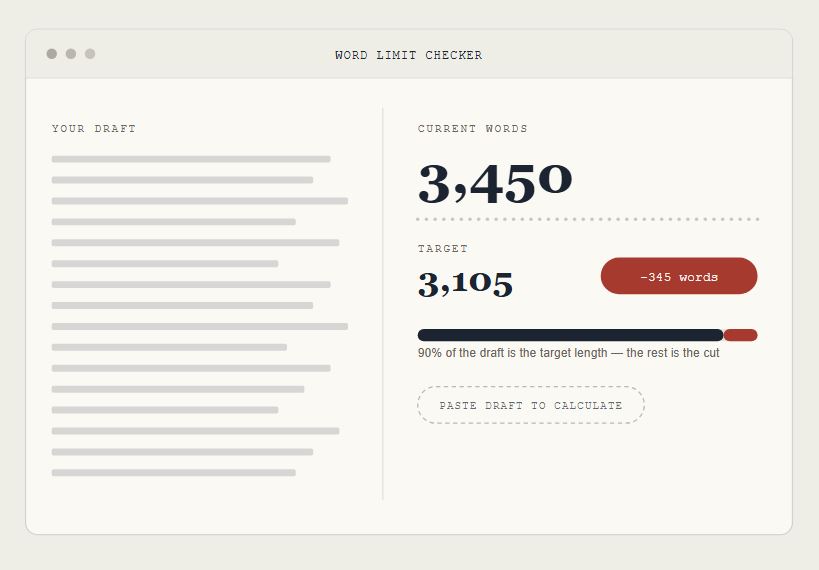
The fastest way to get your real number: paste your draft into a word limit checker, set your target, and let it calculate the gap for you. Working from a PDF instead of a doc? The count can shift depending on how the tool reads the file — here’s how to count words in a PDF correctly. Write your real number down. It’s what turns Step 2 into a fast, focused edit instead of an open-ended one.
Step 2: Find Your Three Longest Paragraphs
Trimming evenly across a whole essay feels productive but barely moves the number. Cut “very,” “just,” and “in order to” throughout a 1,200-word essay, and you might save 20 or 30 words. If your target is 150 words, that’s not close.
Long paragraphs are long for a reason. Usually, they explain something twice, add background the reader doesn’t need yet, or hedge a claim across three extra clauses.
Sort your paragraphs by length — most word processors will show a count for any text you select — and work on the three longest before touching anything else. For each one, ask a single question: does this paragraph make one point, or does it make the same point twice in different words?
Picture an essay where the opening sentence of a paragraph states a claim, and the closing sentence just restates it in slightly different words. That kind of paragraph is usually good for one clean cut, not a dozen small ones. This is also where over-explained methods, repeated transitions, and “as mentioned above” callbacks tend to hide — details that felt necessary while drafting but that a reader doesn’t need repeated.
Step 3: Cut Paragraphs Before You Cut Words
Paragraph-level cuts first. Sentence-level cuts second. The reason is simple math, not style preference.
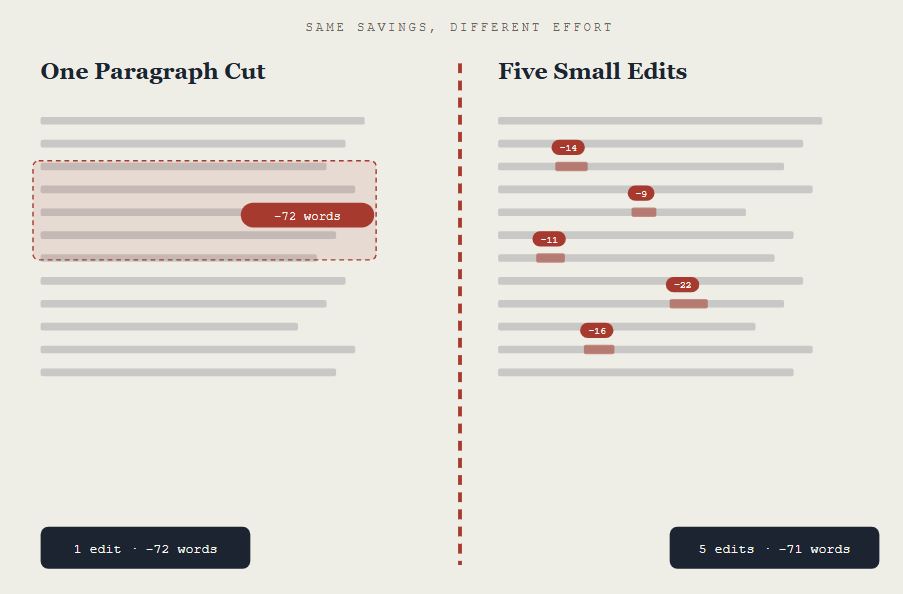
Cutting one genuinely redundant paragraph can remove 40 to 80 words in a single edit. Hunting for filler words sentence by sentence saves two or three words at a time. If you need to lose 150 words, one solid paragraph cut does a third of the job on its own. The same amount of time spent chasing “quite” and “somewhat” barely makes a dent. In short, you reduce word count without losing meaning by cutting the paragraphs that repeat themselves — not by trimming the words that just add texture.
That doesn’t mean sentence-level editing is a waste of time. It’s the second pass, not the first. Once the structural cuts are done, close the rest of the gap with:
- Doubled phrases removed (“various different,” “each and every”)
- Wordy phrases swapped for single words (“due to the fact that” → “because”)
- Qualifiers cut when they don’t change the claim (“very,” “somewhat,” “arguably”)
- Passive sentences turned active, which usually shortens them for free
One warning: don’t cut a paragraph that’s carrying something you actually need, like a methods detail a journal expects, or the one specific example your essay is built around. If a paragraph feels essential but long, look for two paragraphs making related points and merge them, instead of deleting either one.
Step 4: Recheck With a Live Word Counter
Once you’ve hit your target in your own document, check it somewhere that counts the way your reader’s system will — not wherever you happened to edit. Word processors and submission systems don’t always agree with each other. Headers, titles, and hyphenated words get counted differently depending on the tool.
Gaps between a journal’s stated limit and what actually gets submitted are common enough that some editorial offices catch them and send the piece back before it’s even sent out for review.
Run your finished draft through a live word limit checker as your last step, not your first. It should update instantly as you make small final edits, not sit as a static number you keep re-triggering by hand. If you’re still a few words over after Steps 2 and 3, this is where you’ll find them.
The same before-and-after discipline shows up outside of essays, too. If you’re tightening a product flow, our UX writing readability checklist covers a lot of the same paragraph-level cuts. Email editors run into the identical percentage-vs-word-count confusion — see our notes on email readability. And if word count is only half of what you’re optimizing for, we’ve also written about how readability affects SEO rankings.
The Short Version
You don’t need generic shortening tips. You need to cut the right ten percent — not just any ten percent.
Know your real number before you touch anything. Spend your first editing pass on the paragraphs actually carrying the extra weight. Save sentence-level trims for closing the last few words of the gap. Then check the finished draft somewhere that counts the way your submission system will.
Open a word limit checker, set your target from Step 1, and start with your longest paragraph.
Pingback: How to Increase Your Word Count Without Adding Filler (For Students Under the Minimum) - chronoledger.site
Pingback: Word Limit vs. Word Count: What Actually Happens When You Go Over - chronoledger.site