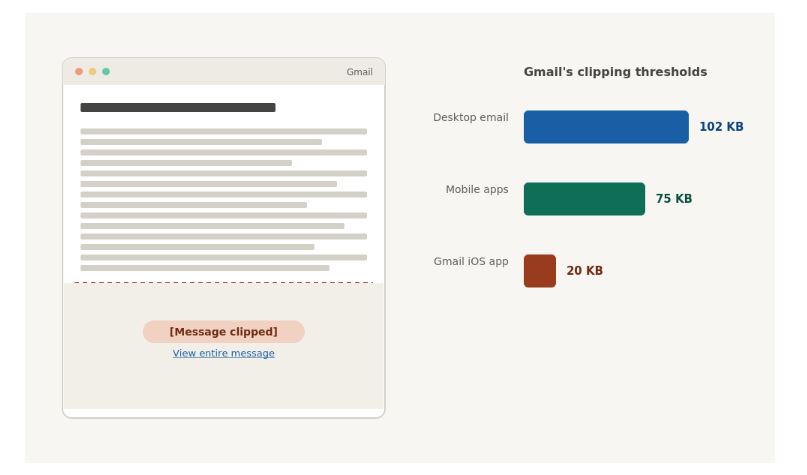
Gmail doesn’t just make long emails feel harder to read. It can cut them off completely. Any HTML email over about 102KB gets truncated mid-message, replaced with a “[Message clipped]” link. On Gmail’s iOS app, that limit drops to around 20KB.
Most email readability tips stop at sentence length. Almost none of them mention that a bloated email can get chopped off before your reader ever reaches your offer.
Here are the email readability tips that hold up: the reading level that actually converts, the technical reason mobile inboxes punish long emails, and a fast check to run before every send.
Why mobile inboxes work against long emails
Two separate problems work against long emails on mobile. Most advice only covers one of them.
The first is perceptual. Small screens make long sentences feel heavier. A 30-word sentence that reads fine on a desktop monitor wraps across four or five lines on a phone. Every wrap makes the sentence harder to hold in your head.
The second is technical, and it’s the one almost nobody mentions. Gmail caps HTML email size at roughly 102KB on desktop. Go over it, and the rest of your email gets hidden behind a link — sometimes mid-sentence, sometimes mid-tag. On mobile, the cap tightens further: around 75KB in most mobile apps, and as low as 20KB in Gmail’s iOS app. A wordy, heavily formatted email can cross that line without you noticing, and lose its own call-to-action along with it, since most CTAs sit near the bottom.
What’s the ideal reading level for marketing emails?
Most marketing emails read best at a 6th to 8th grade reading level. That’s Mailchimp’s own guidance, and it’s built to keep your message accessible without dumbing it down. Engagement tends to drop once content climbs above 10th grade.
A lower reading level doesn’t mean simpler ideas. It means simpler sentences carrying those ideas. You can make a sophisticated offer in short, plain words — you just don’t make the reader work to find it.
If you check your copy with a Flesch Reading Ease score, aim a bit higher for email than you would for a blog post. General web content usually targets a score of 60 to 70. Marketing and consumer copy — including email — tends to perform best in the 70 to 80 range, since it needs to read even faster than an article. Our guide to the Flesch Reading Ease score covers how the formula actually works and why word choice moves it more than sentence length does.
That last point matters more than most email readability tips let on. Swapping “utilize” for “use” or “additional” for “more” can move your score further than cutting a sentence in half. Our plain language guide has a full list of jargon-to-plain-English swaps by industry, if your emails lean on any specialist vocabulary.
How long should your sentences and paragraphs be?
Keep most sentences between 14 and 20 words, and vary the length so the copy doesn’t feel flat. One long sentence followed by a short one reads better than five medium ones in a row. We break down exactly how to do this in our guide to writing shorter sentences without losing meaning.
Readers scan email while multitasking, not reading closely, so anything that demands sustained attention loses them fast. Two to three sentences per paragraph is a safe ceiling. A dense block reads as effort before a single word gets processed.
Active voice helps here too. “We shipped your order” reads faster than “Your order has been shipped,” and it’s usually a few words shorter. If passive constructions tend to creep into your drafts, our guide to passive voice and readability covers how to spot and fix them.
How long should the whole email actually be?
The most-cited number in email marketing is 50 to 125 words for body copy. It traces back to a 2016 Boomerang study of 40 million emails, which found that copy in that range got the strongest response rates. Nearly a decade later, HubSpot, ZeroBounce, and Campaign Monitor still point to the same range in their own guidance.
Treat it as a range, not a rule. A detailed nurture email will run longer than a flash-sale blast, and that’s fine as long as the length matches the job. A product announcement covering three genuinely different features needs more room than a single-offer discount email — padding the discount email out to match would only hurt it.
If you’re testing your own draft’s length, worth knowing: word-count tools don’t always agree on what counts as a word. Contractions, hyphenated terms, and symbols can all be counted differently depending on the tool. We cover why that happens if you’ve ever gotten two different counts from the same paragraph.
What’s the ideal email subject line length?
Aim for 30 to 50 characters, with your most important words in the first 33. That’s tight enough to survive most mobile previews without getting cut off mid-thought.
Mailchimp’s own benchmark data recommends staying under 9 words and 60 characters, with no more than three punctuation marks — more than that starts to read as spam to both readers and filters. Some research suggests longer subject lines can outperform short ones for specific audiences, so test on your own list rather than trusting one number as universal. A B2B list checking email on desktop behaves differently than a consumer list that’s almost entirely mobile.
How to write scannable emails (not just shorter ones)
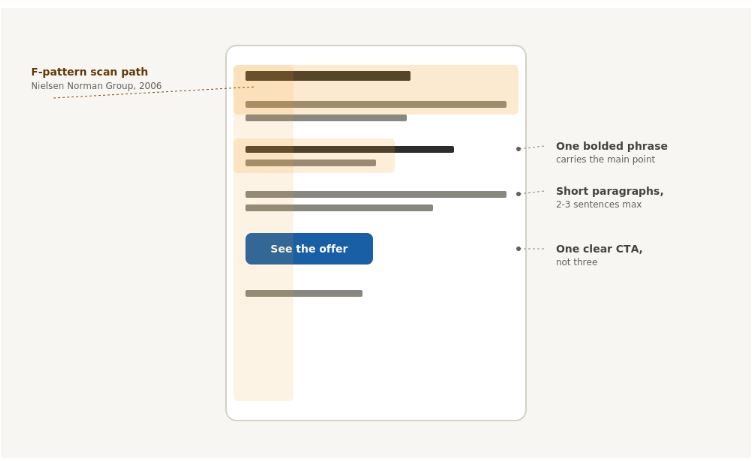
Most email readers don’t read top to bottom. Nielsen Norman Group’s eye-tracking research, first published in 2006, found that people scan web and email content in a rough F shape: a full pass across the top, then shorter passes down the left side, picking up whatever stands out. Here’s how to write scannable emails that work with that pattern instead of against it:
- Short paragraphs. Two to three sentences, max.
- Bold key phrases, sparingly. Enough that the eye catches your main point on a fast skim, not so much that nothing stands out.
- One clear CTA, not three. Multiple calls-to-action split attention and lower the odds any single one gets clicked.
- Bullets for anything list-like. If you’re writing “first… second… third…” inside a paragraph, it should probably be bullets instead.
- A subject line that survives a glance. It’s often the only text a recipient reads before deciding whether to open at all.
A 60-second email readability check before you hit send
Run this before any campaign goes out:
- Check your average sentence length. Aim for 14 to 20 words.
- Count your paragraphs. None should run past 2 to 3 sentences.
- Confirm you have exactly one CTA, not several competing for the same click.
- Estimate your HTML size, or send yourself a test email and check the file size, if you’re anywhere near Gmail’s clipping thresholds.
- Read it once on your phone. Most formatting problems that don’t show up on desktop show up immediately on a small screen.
Paste your draft into ChronoLedger’s checker to see its readability score, sentence length, and word count together, before it reaches an inbox that won’t give you a second chance to make your point.
FAQ
What reading level should marketing emails be written at? Most guidance points to a 6th to 8th grade reading level, based on Mailchimp’s own readability research. Engagement tends to drop once content climbs above 10th grade.
Why does Gmail cut off my email in the middle? Gmail clips any HTML email over roughly 102KB on desktop and replaces the rest with a “[Message clipped]” link. The limit is tighter on mobile — as low as 20KB on Gmail’s iOS app specifically.
How long should a marketing email be? A 2016 Boomerang study of 40 million emails found 50 to 125 words got the strongest response rates, and platforms like HubSpot and Campaign Monitor still point to that range today. Longer, detail-heavy emails can still work when the content genuinely needs the space.
What’s the ideal email subject line length? Most guidance clusters around 30 to 50 characters, with Mailchimp specifically recommending under 9 words and 60 characters. Testing on your own audience matters more than chasing one exact number.
Does a lower reading level mean my emails have to sound simplistic? No. A 6th to 8th grade reading level describes sentence and word complexity, not the sophistication of your offer. Short, plain sentences can still carry a nuanced message — they just don’t make the reader work to find it.
Where to go from here
The mobile inbox is one of the least forgiving formats you’ll write for. Readers are scanning, multitasking, and one oversized email away from losing your CTA to a clipping limit they’ll never see.
These email readability tips come down to the same core moves: keep sentences short, paragraphs shorter, and check your draft’s size and reading level before you hit send — not after the open rates come in.
Pingback: What Reading Level Should a Blog Post Be? A Grade-Level Guide by Content Type - chronoledger.site