A paragraph counter can count your paragraphs. It can’t tell you if they’re doing their job.
That’s the real question when you’re staring at a 1,000-word draft. Do eight paragraphs look too thin? Do eighteen look choppy? The answer depends on what you’re writing and who’s reading it. A college essay needs room to build an argument. A blog post needs white space, because most people don’t read on screens — they scan.
Use the ranges below as a starting point, not a rule. The real test isn’t “did I hit the right number?” It’s “does each paragraph make one clear point, at a pace people can actually follow?”
What a Paragraph Counter Actually Counts
A paragraph is just a block of text set off by a line break. Word processors, Google Docs, and WordPress all handle the spacing a little differently, but the idea is the same: a new paragraph starts wherever you start one.
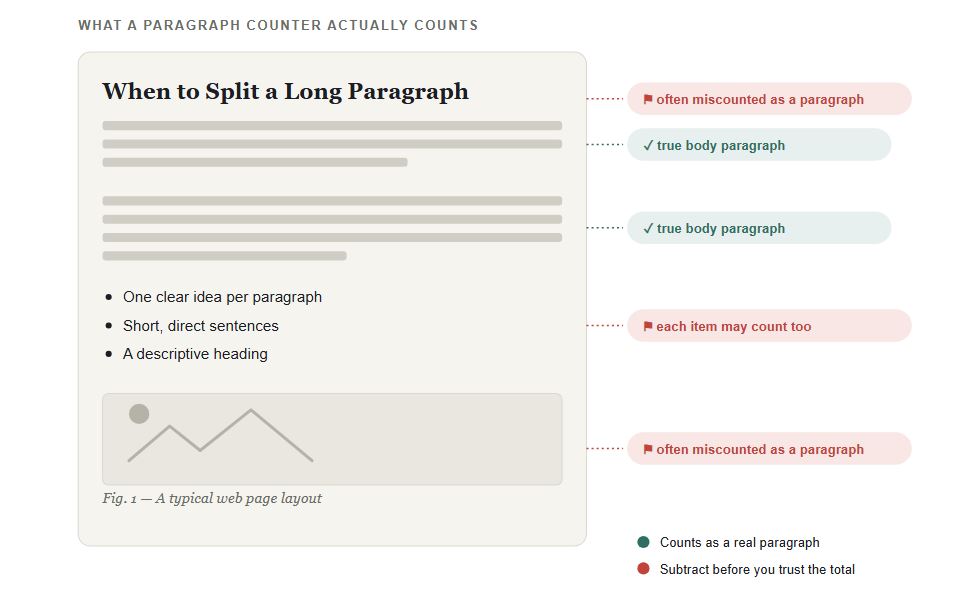
Here’s the catch. Most paragraph counters count blocks, not meaning. They can’t tell a body paragraph from a heading, a caption, or one line of a bulleted list.
So before you trust the number, check what you actually need to count:
- Writing a blog post? Count every visible block. Headings and captions still affect how dense the page feels.
- Writing for a class? Your instructor probably means body paragraphs only. Leave out headings, references, quotes, and list items.
- Publishing in WordPress? A Gutenberg block (the individual content sections WordPress uses to build a page) can create visual spacing that doesn’t always match a plain word counter.
One rule holds up everywhere: a paragraph should carry one idea. In a widely cited study, Nielsen Norman Group found that most web readers scan a new page rather than read it word by word, and that concise, scannable writing measurably improved how well people could use a page — in one test, by well over 100%. That’s exactly why single-idea paragraphs work better online than long, dense ones.
How Many Paragraphs Do You Actually Need?
There’s no official number. But you can estimate a reasonable one by dividing your word count by a realistic paragraph length for your format.
Web paragraphs tend to run short: 40 to 100 words, or two to four sentences. Academic paragraphs need more room, usually 100 to 200 words, because each one has to make a point, support it, and explain why it matters.
| Word count | Web article | Academic essay | Typical shape |
|---|---|---|---|
| 500 words | 5–7 paragraphs | 3–5 paragraphs | Short intro, 3–5 points, a close |
| 1,000 words | 10–14 paragraphs | 5–10 paragraphs | A few sections for web; intro–body–conclusion for essays |
| 1,500 words | 15–20 paragraphs | 8–15 paragraphs | A full guide with examples, or an evidence-heavy essay |
Treat these as working ranges, not grades. The same 1,000 words could be six long academic paragraphs or thirteen short web ones — because the reader’s experience is different in each case.
A Simple Way to Estimate Your Own Count
Estimated paragraphs = target word count ÷ average words per paragraph
Say you’re writing a 1,000-word blog post and your paragraphs average 75 words:
1,000 ÷ 75 ≈ 13 paragraphs
That’s a guide, not a rule. Your intro might be two short 35-word paragraphs. A section further down might need 110 words to explain something properly. The average just helps you spot whether your draft has gotten too dense, or too chopped up.
Plan sections first, then paragraphs. Decide what each heading needs to answer, and let the paragraph count come out of the explanation. Start with “I need 12 paragraphs,” and you’ll end up padding.
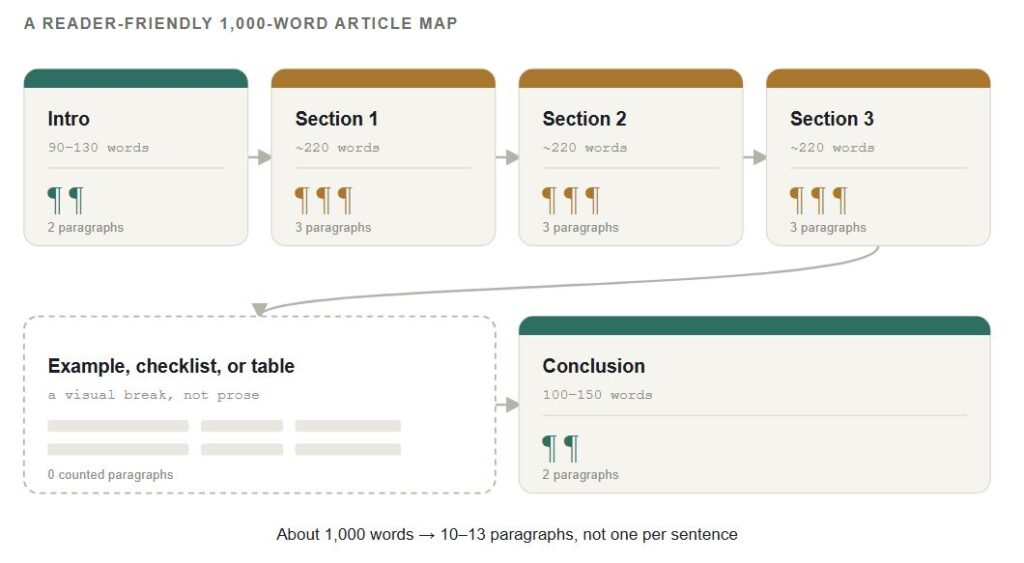
What a Reader-Friendly 1,000-Word Article Looks Like
- Two short intro paragraphs (90–130 words total)
- Three sections, three paragraphs each (roughly 650–750 words)
- One example, checklist, or table to break up the text
- Two closing paragraphs (100–150 words total)
That adds up to 10–13 paragraphs, without chopping every sentence into its own block just to hit a target.
When to Split a Long Paragraph
Split a paragraph when your reader needs a pause. Not because a tool says you’ve crossed some limit.
Online, a paragraph gets hard to read when it looks like a wall of text, covers more than one idea, or buries its point in the middle. This isn’t a guess. Nielsen Norman Group’s research found that the large majority of web readers scan a page instead of reading it in full, which is exactly why dense, unbroken paragraphs lose people fast.
Split when:
- You introduce a new claim, example, or step
- Your topic sentence no longer matches everything below it
- The main point is buried halfway through the paragraph
- The block looks intimidating on a phone screen
Leave it alone when every sentence supports the same idea and it’s still easy to follow. And don’t split just to add white space. A string of one-line paragraphs gets choppy fast, and a single short line only works as occasional emphasis.
Paragraph Length Isn’t the Same as Sentence Length
A 120-word paragraph can read easily if it’s four direct sentences building one idea. A 60-word paragraph can feel exhausting if it’s one sentence stuffed with clauses.
For web writing, work on both levels at once:
- One idea per paragraph
- Lead with the point, not the setup
- Use short, direct sentences when the idea itself is complex
- Break up density with headings, bullets, or a quick example
Checking Your Count: Word, Google Docs, and Online Tools
A paragraph counter is most useful at the end of a draft, when you’re checking rhythm — not while you’re still writing.
In Microsoft Word: Click the word-count number in the status bar to open the full count. It shows words, characters, lines, and paragraphs together. Word can also count just a selection, which is handy when you want the body count without your title or references.
In Google Docs: The word-count dialog works the same way, but don’t trust it blindly — especially after pasting text from email, a CMS, or an AI tool. Pasted content often carries hidden line breaks that inflate the count. Highlight only the body text before you check, and confirm by eye that every counted block is a real paragraph.
In an online paragraph counter: A good one reports total paragraphs, average length, longest paragraph, and words per paragraph. That’s useful for spotting problems fast. Four paragraphs across 1,000 words means an average of 250 words each — fine for a formal essay, usually too dense for a blog post. Thirty paragraphs across 1,000 words usually means you’re over-fragmenting, unless the format is meant to be highly visual.
One thing to know: most counters treat headings and list items as paragraphs, because they detect line breaks, not intent. If you need a body-paragraph count only, subtract those by hand.
And remember what a counter can’t do. It can’t tell you if your ideas repeat, if a transition is missing, or if you actually answered the question you set out to answer. Twelve well-sized paragraphs can still add up to a weak piece of writing.
Use the Count as a Diagnostic, Not a Target
For a 500-word piece, give readers enough breaks that they’re not stuck in one long block. For 1,000 and 1,500 words, give each section room to make its point, then split the moment the topic shifts.
Before you publish, do three things: count your paragraphs, scan the page at mobile width, and check whether every block earns its place. If a paragraph is carrying two ideas, fix the structure first. The count will sort itself out after that.
Want to check your own draft? Paste it into the paragraph counter tool on this page to see your total paragraph count, average length, and longest paragraph at a glance.
Related Posts:
Pingback: How to Increase Your Word Count Without Adding Filler (For Students Under the Minimum) - chronoledger.site