There are two character counters; they apply to the same paragraph, one showing 147 and the other 121, yet when you paste the text into the form that you actually need it is still rejected.
Both of the counters are working properly; they are merely keeping track of different things. One includes every character you typed, such as the spaces, while the other first removes the spaces. The important issue isn’t which of the two numbers is smaller, but rather which rule the platform you’re posting to actually employs.
In short, if a form states “maximum characters”, include every single character — that is to say, all spaces and punctuation marks as well as line breaks. When assessing your writing, use the figure that excludes spaces to measure how dense it is, not to try and get past the character limit. After that, copy and paste your final text onto the actual platform and find out what it says.
Why the same text gives two different totals
A character is not merely a letter; in counters, letters, numbers, punctuation marks, spaces, and line breaks are all treated as characters. The phrase “Hello world!” has 12 characters when you count both the space and the exclamation mark. If you remove them, however, then 10 remain.
The figures are real; they just provide different answers.
Count type What it measures Where it matters
With spaces The text exactly as it appears Forms, bios, captions, most platform limits Without spaces The text with whitespace removed Editing stats, comparing how dense your writing is
The difference between the two is generally about your space count — although it’s not always exact. It can be affected by tabs, line breaks, double spaces, and pasted formatting. While some programs remove only ordinary spaces, others eliminate all kinds of whitespace.
As a general rule, if the instructions only refer to “characters”, then count them including the spaces. If they say “excluding spaces”, use that figure. If it’s not clear, include a margin and check the actual result before you finally submit it.
What actually counts on the platforms you use
There is no single set of standards; each platform establishes its own rules, and those rules are subject to change over time.
Take X. Standard posts have a limit of 280 characters. Premium posts in X can go up to 25,000 characters. In neither case are spaces excluded — a character is still a character.
A generic counter is acceptable when preparing a draft; it is only with the platform’s own text box that you can properly test it. You should always paste the final version of your text, not an earlier draft. Anything such as a link, an emoji, a line break, or a smart quote may affect whether the text is accepted.
Where you’re posting Safe assumption What can throw off the count
Application or essay form Count with spaces and line breaks Some forms only reject text once you hit submit. Social post Trust the platform’s own counter Limits vary by tier, and links or formatting can shift the count. SMS Count the final, encoded message Encoding type changes how much room you actually have Meta description Write it tight, but don’t treat 155 as a hard cap Google can rewrite or cut the snippet anyway Ad headline or profile field Follow the current platform spec “Maximum” and “recommended length” aren’t the same thing SMS breaks the rules in its own way
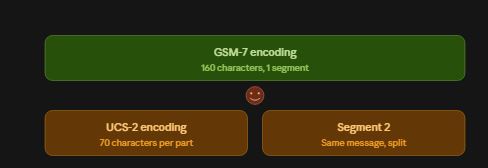
The problem with text messages is not just one of space. A single GSM-7 SMS segment can contain up to 160 characters. If UCS-2 encoding is used, the number decreases to 70. Multi-part messages have even less per segment—153 characters with GSM-7 and 67 with UCS-2.
The problem is that a single emoji or a single curly quote can cause your message to be encoded using UCS-2. Even if your text appears to be well under 160 characters it may still be divided into two or three charged segments—not since it is too long—but because the character set has changed.
If either the cost or the delivery is important, then you should use the segment calculator provided by your SMS provider; a simple count of ‘characters with spaces’ won’t show you how the message will actually be encoded.
Meta descriptions don’t have a fixed limit
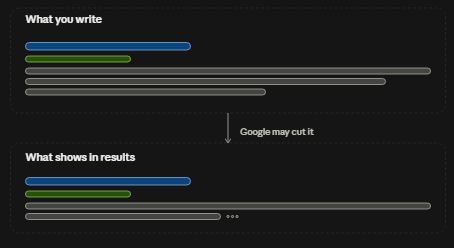
Much of the advice on SEO sticks to the same rule—that meta descriptions should be kept between 150 and 160 characters. While that is a useful aim, it is not an actual limit set by Google. The company has stated that there is no maximum length for the meta description tag; Google will take text either from the tag or from the page to construct a snippet and then cut it down to fit the screen.
Make sure your description gets straight to the point and keep it brief since people are scanning search results rather than because a particular number has any guarantee.
A five-step check before you hit submit
- Put the text you have created into a counter.
- Make sure there is a space after the total.
- You should compare it with the total figure when there are no spaces, in order to see where the gap arises.
- Look for emojis, curly quotes, non-Latin characters, tabs, and line breaks.
- Enter that identical text into the actual platform and rely on its character count rather than any general tool.
Instead, when publishing, count the draft as it will actually appear and not count it as a clean draft and then add a link or signature afterwards.
Just how much do spaces actually add?
In ordinary English writing, spaces amount to about 15 to 20 characters per 100 words. This is only an approximate estimate, not a formula. A passage of 500 words could contain 400 to 500 spaces—though copied formatting may include extra tabs or line breaks which increase the total number.
If the totals in a short paragraph vary by hundreds, don’t begin by deleting sentences—first check the whitespace and the counter’s settings.
The number that actually matters
For most forms, when entering bios, captions, and all other ordinary fields on the platform, count inclusive of spaces. The text you are submitting includes any blank characters.
There are two exceptions: if a platform specifically requests it, then follow the no-spaces rule, and if a service is measuring bytes, encoded characters, or links rather than what you see on the screen, use the platform-specific tool.
If two counters are in disagreement, do not simply go with the smaller of the two numbers. Instead, work out what each counter actually represents. Then copy your final text into the actual destination and have confidence in that result.