You paste a draft into Grammarly, click over to the Performance panel, and hit a wall — the readability score is Pro-only. So you open a free readability checker instead, paste the same text, and get a grade level back. But you don’t actually know if that number means the same thing, or whether it deserves the same trust as the tool you went looking for in the first place.
Here’s what each type of tool measures, where the formulas genuinely diverge, and a three-minute check you can run yourself before you report either score to a client or a boss.
In this piece:
- What each type of tool actually measures
- Where the underlying formulas differ
- When a free standalone checker is enough
- When Grammarly earns the subscription
- A three-minute test to stress-test any score before you trust it
What Each Type of Tool Measures
Grammarly is a writing suite that added readability as one feature among several. The free tier is grammar and spelling only. On Pro, opening the Performance report shows one number plus a short label — something like “easily understood by a broad audience.” That’s the whole feature: one score, one line of context, no breakdown of what produced it.
A standalone readability checker exists to do only that job, so it tends to go deeper: several formulas run in parallel — commonly Flesch-Kincaid Grade Level, Gunning Fog, SMOG, Coleman-Liau, and Automated Readability Index — usually averaged into a consensus grade, with sentence-level highlighting showing which lines are dragging the score down.
Neither is “more correct” by design. Grammarly’s version is built to be a glance mid-edit. A dedicated checker is built to be the main event.
Where the Formulas Actually Differ
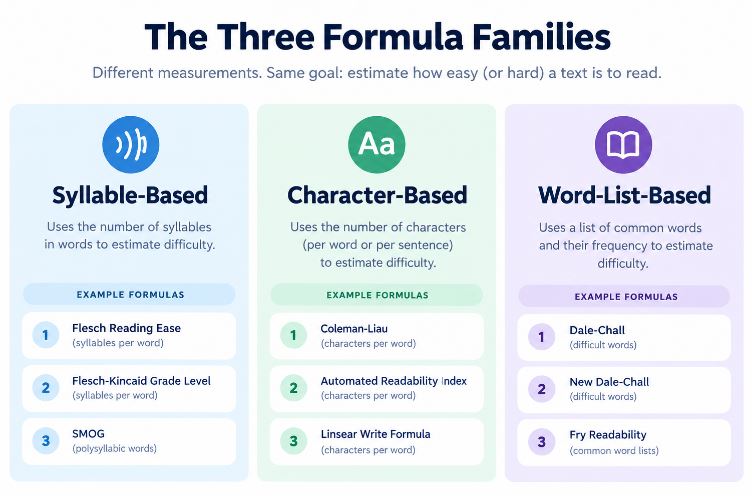
Readability formulas fall into three families, and knowing which one you’re looking at matters before you compare two scores:
Syllable-based (Flesch Reading Ease, Flesch-Kincaid, Gunning Fog, SMOG) count syllables per word and words per sentence. They penalize multi-syllable vocabulary hard — which is why dense technical writing built from short words but heavy jargon can score better than it actually reads.
Character-based (Coleman-Liau, Automated Readability Index) count letters per word instead of syllables. They hold up better on text full of acronyms, abbreviations, and numbers, since syllable-counting tends to choke on those.
Word-list-based (Dale-Chall, Spache) check your vocabulary against a list of words considered familiar to average readers. Useful for lower reading levels; less useful for specialist audiences who know the specific “hard” words the list doesn’t.
Grammarly’s own documentation is consistent on this point: the score comes from the Flesch reading-ease test, based on average sentence length and average word length, on a 0–100 scale (not a grade level). That much is well-documented and not really in dispute.
What Grammarly doesn’t give you is the arithmetic. You get the final number and a one-line label — not the sentence count, word count, or syllable count that fed into it, and no view of which sentences pulled the score down. A multi-formula tool’s real advantage isn’t a different or better formula — it’s that it shows its work, sentence by sentence, so you can see exactly where the score is coming from instead of trusting an unexplained single output.
When a Free Standalone Checker Is Enough
A few situations where Pro buys you nothing extra on the readability side:
You need a specific grade level, not a vibe. A brief that says “grade 6 for patient information” or “keep this under grade 8” isn’t answered by a vague label — it needs a named formula’s actual output.
You’re checking volume. Auditing thirty landing pages one at a time in Grammarly’s editor is slower than pasting each into a tool built for quick, repeated checks.
You need a number to cite. “We brought this from grade 12 to grade 8” is a defensible line in a client report. “Easily understood by a broad audience” isn’t.
The text is sensitive. Grammarly checks run through its servers. For confidential drafts, medical content, or anything you’d rather not transmit anywhere, a tool that runs entirely in your browser is the safer default — worth confirming against Grammarly’s current privacy policy if data handling is a real concern for your work.
The subscription genuinely doesn’t pencil out. Grammarly’s Pro plan runs $30/month billed monthly, or $12/month (about $144/year) if you commit to a year upfront. For a freelancer or small team working in a currency where that’s a meaningful chunk of monthly income, and where readability is a small slice of what the subscription is for, a free multi-formula checker covers that one need at zero cost.
When Grammarly Earns Its Keep
The reverse holds too. Grammarly is worth paying for when:
You need grammar caught, not just grade level measured. Comma splices, subject-verb agreement, dangling modifiers — no readability formula touches any of these, and if you’re writing in a second language, mechanical correctness usually matters more than the grade-level number.
You’re keeping one voice across a team. Grammarly’s style-guide and tone features operate at the document level across multiple writers. A readability score alone won’t do that job.
You write everywhere, not just in one editor. A browser extension that follows you into Gmail, Docs, and social platforms does something a one-paste-at-a-time web tool can’t replicate.
You want rewrites, not just a diagnosis. A readability score tells you the grade level. It doesn’t touch the sentence. Grammarly’s suggestion engine will at least attempt a fix, even if you reject half of what it offers.
A Three-Minute Test Before You Trust Either Score
Word-count and sentence-count formulas are more fragile than they look, because they depend entirely on how a tool splits text into words and sentences — and that splitting logic breaks in predictable ways. Before you decide either number is “wrong,” or right, run this on your own text:
- Strip URLs first, then check again with them left in. A long link can get parsed as a single, enormous “word” that also counts as its own “sentence.” Depending on the tool, that can swing a score dramatically in either direction — not because the writing changed, but because the sentence-length math just absorbed a 60-character non-word. If your draft has any links in it, always check readability on a URL-free version.
- Look at how each tool handles a sentence ending in an abbreviation. Something like “…using AI.” can occasionally get misread as two merged sentences if a period after a capital letter gets treated as an abbreviation marker rather than a sentence break. If your text is full of acronyms, run the abbreviation-heavy sentences through both tools separately and see if the sentence count matches what you’d count by hand.
- Paste plain text, not rich text. Formatting artifacts — especially italics or bold running into the next word without a space — can produce garbled non-words that neither grammar nor readability engines handle cleanly.
- Treat anything within about a grade of each other as agreement. Formulas built on similar inputs will land close together. That’s not one tool being more accurate than the other — it’s confirmation. A gap wider than a grade or so is your cue to check for one of the input issues above before assuming the writing itself is the problem.
- Remember what “grade level” is actually normed on. These formulas were built and tested on English text using U.S. school-grade conventions. If you’re writing for readers in South Asia, Southeast Asia, Latin America, Africa, or the Middle East, a grade-level number is a rough proxy for sentence and word complexity — not a certified reading-level guarantee for your actual audience. Shorter sentences and plainer words still help; just hold the specific number loosely.
Grammarly vs. a Standalone Readability Checker
| Grammarly | Standalone readability checker | |
|---|---|---|
| Readability score | One number, Pro only | Multiple named formulas, usually free |
| Formula transparency | Named formula, but no visible calculation | Each formula’s output shown individually |
| Grammar/spelling | Yes, core feature | Not typically included |
| Sentence-level breakdown | Limited | Common — flags the hardest sentences |
| Where text is processed | Sent to Grammarly’s servers | Often fully in-browser |
| Cost for readability alone | Requires Pro (~$12–30/mo) | Usually free |
| Best for | Ongoing grammar and tone editing across devices | One-off grade-level checks, audits, sensitive drafts |
FAQ
Does Grammarly’s free plan show a readability score?
No. Readability sits in the Performance report, which requires a Pro subscription. The free plan covers grammar and spelling only.
Is Grammarly’s readability score the same as Flesch-Kincaid grade level?
Not quite. Grammarly’s score is the Flesch reading-ease test — a 0–100 scale, not a grade-level number. Flesch-Kincaid Grade Level is a related but separate formula that outputs a U.S. school grade. If a brief or compliance requirement asks for a specific named grade-level formula, a multi-formula tool that labels each result separately is the more verifiable option.
Can a free tool replace Grammarly entirely?
No — they solve different problems. A readability checker tells you how hard your writing is to read. It won’t catch a comma splice or a subject-verb mismatch. Most people who care about both use a separate tool for each.
The Bottom Line
Grammarly and a standalone readability checker aren’t competing for the same job. One is a grammar suite with a readability feature added on behind a paywall; the other exists to answer exactly one question, usually for free, and usually shows more of its work doing it. If you only need a grade-level number — for a brief, an audit, or a sensitive draft — a standalone checker gets you there without the subscription. If you need grammar corrections and consistency across a team, Grammarly still earns its cost — just don’t treat its one readability number as the final word. Either way, run the URL-and-abbreviation check above once before you put a score in front of a client.
Pingback: Punctuation Checker: 7 Common Mistakes (and What It Misses)
Pingback: What Is a Flesch Reading Ease Score? A Plain-English Guide - chronoledger.site